
The right message to the right customer.
Is your brand a coffee chain, fine dining, casual? Your loyalty segmentation should be too. Connected Pro's Smart Segmentation tunes the RFM model to your vertical, automatically identifies your Champions, the regulars you're about to lose, and the winnable churners. Set it up once; work with fresh segments every day.
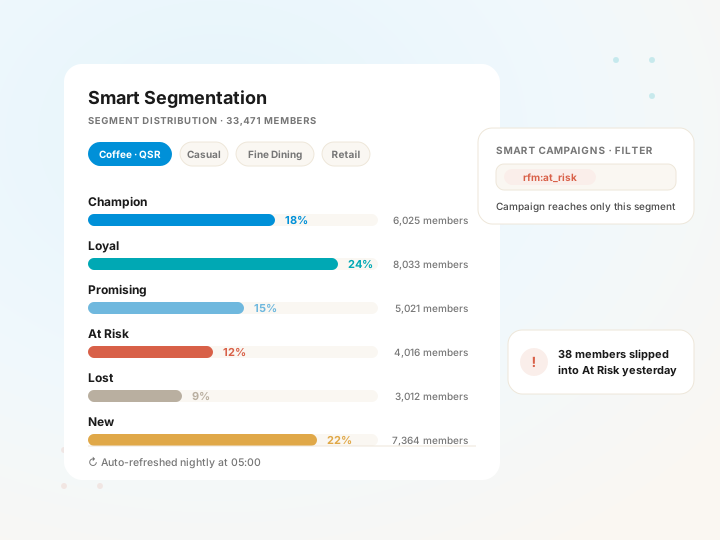
Three dimensions, one customer portrait.
RFM, Recency, Frequency, Monetary, measures every customer's behavior across three independent axes. Each member gets an RFM code, the code maps to a segment, the segment maps to an action. Simple but powerful: tuned right, 4–6 segments drive the majority of your campaign decisions.
Recency
When did the customer last visit? Lower day count = higher score. You spot a regular crossing the "At Risk" line within hours of it happening.
Frequency
How many times in the window you choose? For a coffee chain that's 20/month; for fine dining, 4/year, the vertical drives the bar.
Monetary
Total spend or average ticket? For coffee, total is the right answer; for fine dining, AOV. Your brand picks.
The same RFM doesn't fit every brand. Ours does.
Most loyalty platforms run a single RFM formula for every brand. The result: a coffee chain and a fine-dining restaurant get the same "Champion" definition, one is right, the other is wrong. Smart Segmentation runs the right model for every brand thanks to vertical templates.
Pick your vertical. The rest sets itself up.
When you log into the Hub you pick one of four templates. The template configures your monetary metric, lookback window and segment mapping for your vertical. You can fine-tune later, but the baseline is right out of the gate.
Coffee · QSR
High frequency, low ticket. 6-month lookback. Monetary = total spend. "Champion" = 3+ visits/week, basket size matters less.
Casual dining
Medium frequency, medium ticket. 12-month lookback. Monetary = total. "Champion" = 2+ visits/month with steady basket.
Fine dining
Low frequency, high ticket. 18-month lookback. Monetary = AOV. "Champion" = 4+ visits/year above-average ticket.
Retail & service
Mixed pattern. 12-month lookback. Brand chooses monetary and window, built especially for retail chains.
Each segment maps to a clear next step.
The RFM code maps to a segment, the segment maps to a campaign type. In the Hub, segment labels (`rfm:champion`, `rfm:at_risk`, etc.) work as direct filters in Smart Campaigns, no new surface to learn.
Champion
Most loyal, most valuable, recent. Focus on keeping them, not winning them, exclusive previews, personal thanks, not discounts.
Loyal
Stable regulars. Goal: lift frequency, deepen the relationship. Birthdays, anniversaries, new-product launches.
Promising
On the right track, a few nudges away from Loyal. Easy-to-redeem small rewards.
At Risk
Used to be a regular, last visit drifted. The right message can bring them back, once they're Lost, the cost goes up.
Lost
Long since visited. One-shot win-back; if no response, move on, don't waste budget.
New
First or second visit. Goal: lock in the second visit. Warm welcome, easy first reward, profile completion.
Three steps to campaign targeting.
Pick your template
A one-time Hub setting. Coffee, casual, fine dining? Lookback and monetary metric come bundled with the template, change them if you want.
Scores refresh every day
The system re-scores your entire member base every night. A regular drifting into "At Risk" appears in that segment the next morning.
Target by tag
In Smart Campaigns, drop `rfm:at_risk` into the filter, the campaign only reaches that segment. No SQL, no new tool.
See your members at a glance.
The Hub's Segment Distribution report shows how your member base splits across the six segments and which segment drives what share of your revenue. "Is my Champion count growing or shrinking?", a question you can answer every week. Strategy stops being a hunch and gets tied to measurement.
Quick answers.
Which plans include it?
It's included in Connected Pro. On Connected, you can add it as a paid add-on without changing plans. Lite doesn't offer it, because it needs basket-level data from a POS integration.
Do my members see the segment label?
No. Segment labels are shown only to the brand, to you. Customers do not see "At Risk" in their WebApp.
Can I change the template later?
Yes. The template is a starting point. Monetary metric (total vs. AOV) and lookback (6/12/18/24 months) can be changed from the Hub.
How often do scores refresh?
Daily, at 05:00 local time. New data flows into segments by the next morning. You can also trigger a refresh manually from the Hub.
What about my existing members?
When you turn Smart Segmentation on, your entire member base is scored in a one-off run, no waiting until tomorrow. Existing data doesn't go to waste.